QUESTION 99
Please wait while the virtual machine loads. Once loaded, you may proceed to the lab section. This may take a few minutes, and the wait time will not be deducted from your overall test time.
When the Next button is available, click it to access the lab section. In this section, you will perform a set of tasks in a live environment. While most functionality will be available to you as it would be in a live environment, some functionality (e.g., copy and paste, ability to navigate to external websites) will not be possible by design.
Scoring is based on the outcome of performing the tasks stated in the lab. In other words, it doesn’t matter how you accomplish the task, if you successfully perform it, you will earn credit for that task.
Labs are not timed separately, and this exam may more than one lab that you must complete. You can use as much time as you would like to complete each lab. But, you should manage your time appropriately to ensure that you are able to complete the lab(s) and all other sections of the exam in the time provided.
Please note that once you submit your work by clicking the Next button within a lab, you will NOT be able to return to the lab.
Username and password
Use the following login credentials as needed:
To enter your username, place your cursor in the Sign in box and click on the username below.
To enter your password, place your cursor in the Enter password box and click on the password below.
Microsoft 365 Username:
admin@[email protected]
Microsoft 365 Password: &=Q8v@2qGzYz
If the Microsoft 365 portal does not load successfully in the browser, press CTRL-K to reload the portal in a new browser tab.
The following information is for technical support only:
Lab instance: 11032396
You need to ensure that email messages in Exchange Online and documents in SharePoint Online are retained for eight years.
To complete this task, sign in to the Microsoft Office 365 admin center.
See explanation below.
Explanation
NB: For our purposes, the retention period will be 8 years.
For retaining email messages in Exchange Online:
Step 1: Create a retention tag
1. Navigate to the Exchange Admin Center
2. Navigate to Compliance management > Retention tags, and then click Add +
3. Select one of the following options:
* Applied automatically to entire mailbox (default): Select this option to create a default policy tag (DPT). You can use DPTs to create a default deletion policy and a default archive policy, which applies to all items in the mailbox.
* Applied automatically to a specific folder: Select this option to create a retention policy tag (RPT) for a default folder such as Inbox or Deleted Items.
* Applied by users to items and folders (Personal): Select this option to create personal tags. These tags allow Outlook and Outlook on the web (formerly known as Outlook Web App) users to apply archive or deletion settings to a message or folders that are different from the settings applied to the parent folder or the entire mailbox.
4. The New retention tag page title and options will vary depending on the type of tag you selected. Complete the following fields:
* Name: Enter a name for the retention tag. The tag name is for display purposes and doesn’t have any impact on the folder or item a tag is applied to. Consider that the personal tags you provision for users are available in Outlook and Outlook on the web.
* Apply this tag to the following default folder: This option is available only if you selected Applied automatically to a specific folder.
* Retention action: Select one of the following actions to be taken after the item reaches its retention period:
* Delete and Allow Recovery: Select this action to delete items but allow users to recover them using the Recover Deleted Items option in Outlook or Outlook on the web. Items are retained until the deleted item retention period configured for the mailbox database or the mailbox user is reached.
* Permanently Delete: Select this option to permanently delete the item from the mailbox database.
* Move to Archive: This action is available only if you’re creating a DPT or a personal tag. Select this action to move items to the user’s In-Place Archive.
* Retention period: Select one of the following options:
* Never: Select this option to specify that items should never be deleted or moved to the archive.
* When the item reaches the following age (in days): Select this option and specify the number of days to retain items before they’re moved or deleted. The retention age for all supported items except Calendar and Tasks is calculated from the date an item is received or created. Retention age for Calendar and Tasks items is calculated from the end date.
* Comment: User this optional field to enter any administrative notes or comments. The field isn’t displayed to users.
Step 2: Create a retention policy
1. Navigate to Compliance management > Retention policies, and then click Add +
2. In New Retention Policy, complete the following fields:
* Name: Enter a name for the retention policy.
* Retention tags: Click Add + to select the tags you want to add to this retention policy.
A retention policy can contain the following tags:
* One DPT with the Move to Archive action.
* One DPT with the Delete and Allow Recovery or Permanently Delete actions.
* One DPT for voice mail messages with the Delete and Allow Recovery or Permanently Delete actions.
* One RPT per default folder such as Inbox to delete items.
* Any number of personal tags.
Step 3: Apply a retention policy to mailbox users
After you create a retention policy, you must apply it to mailbox users. You can apply different retention policies to different set of users.
* Navigate to Recipients > Mailboxes
* In the list view, use the Shift or Ctrl keys to select multiple mailboxes.
* In the details pane, click More options
* Under Retention Policy, click
* In Bulk Assign Retention Policy, select the retention policy you want to apply to the mailboxes, and then click Save.
For retaining documents in SharePoint Online
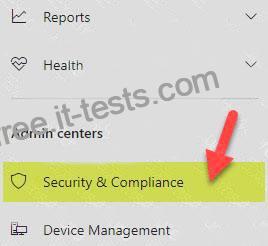
Access Security & Compliance Admin Center
1. Navigate to the Office 365 Admin Centers
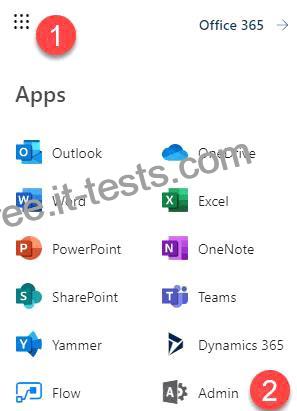
2. From the list of available Admin Centers, click on Security & Compliance
How to create and publish a Retention Policy on a SharePoint site
Now that we are in the Security & Compliance Admin Center, we are ready to create and publish a Retention Policy on a SharePoint site.Under
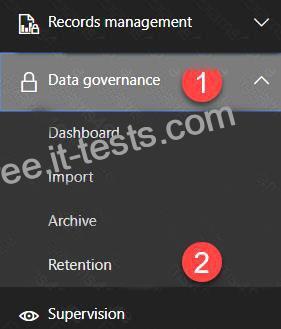
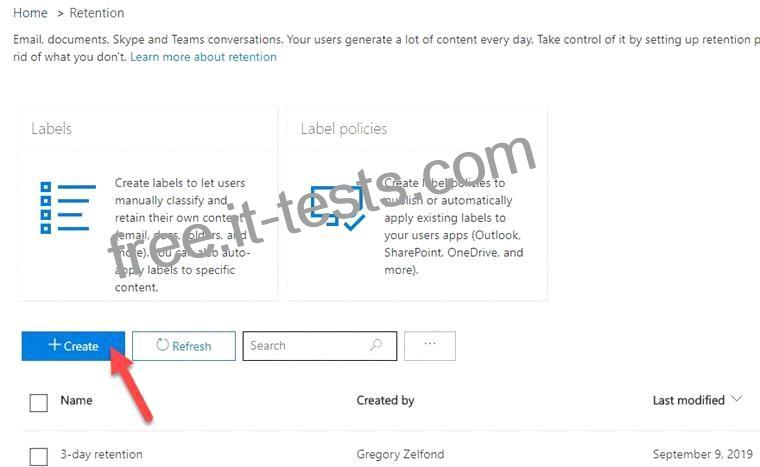
1. Hit Create button to create new Retention Policy
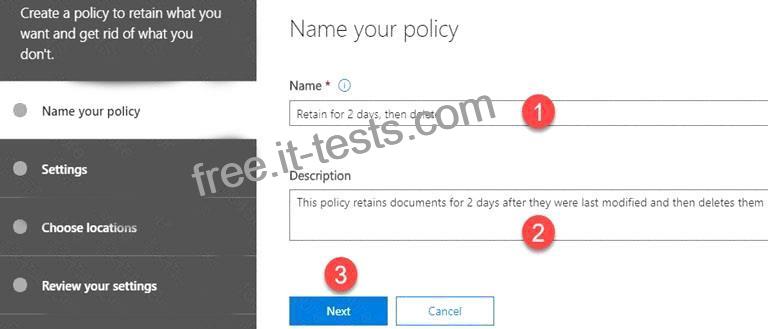
2. Give your policy a name and description.
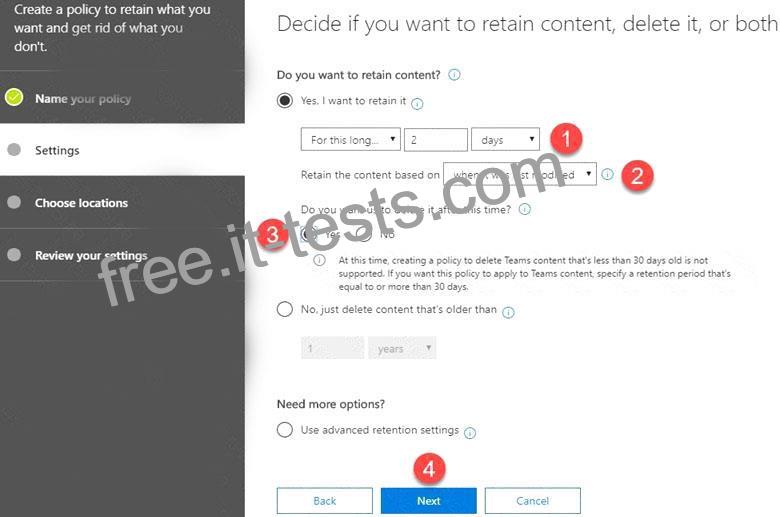
3. On the next screen is where you set up the logic. You can configure how many days, months, or years to retain the content for, specify whether you want the math (retention period) to be calculated from the Created Date or Last Modified Date. Lastly, you can also specify whether you want to keep or delete content after the Retention period expires. Hit Next
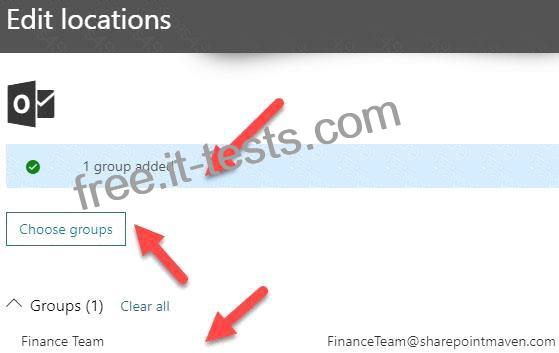
4. On the next screen, you get to choose where to apply the policy. You can apply it to email (Exchange), SharePoint sites, OneDrive accounts as well as Office 365 Groups.
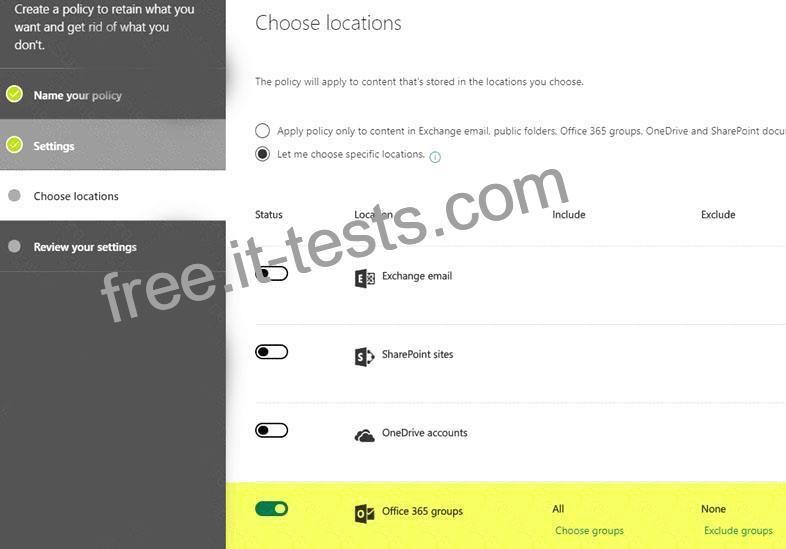
5. In my case, I applied a policy to a single Office 365 Group Site
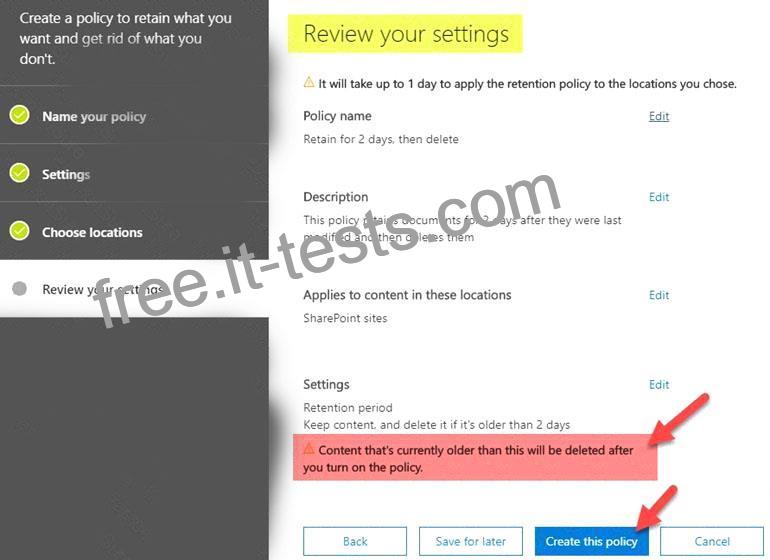
6. On a final screen, you need to review and confirm the settings and click Create this policy button. It is imperative to note the message you get to see at the bottom. It warns you that content might be deleted as soon as the policy takes effect according to the logic you set up in previous steps.
References:
https://docs.microsoft.com/en-us/exchange/security-and-compliance/messaging-records-management/create-a-re
https://docs.microsoft.com/en-us/exchange/security-and-compliance/messaging-records-management/apply-reten
https://sharepointmaven.com/how-to-set-a-retention-policy-on-a-sharepoint-site/


